
Donor Benefits

Muny Donor Benefits
To thank you for generously supporting our theatre, please enjoy these benefits designed exclusively for Muny Guarantors!

Choose your gift level to learn about your benefits
$100–$499 | $500–$999 | $1,000–$2,499 | $2,500–$4,999 | $5,000–$9,999 | $10,000+
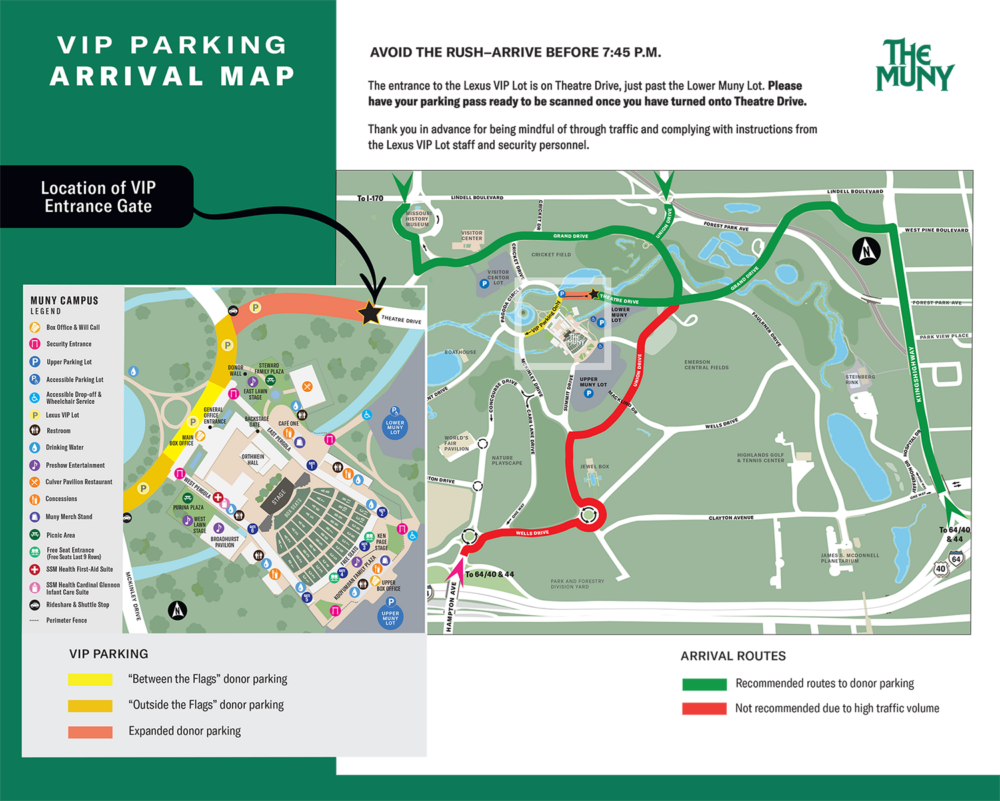
🚗 VIP Parking
Parking Pass FAQs
Please contact the Muny Guarantors office at (314) 595-5731 or (314) 595-5771 or [email protected] to have them re-sent. Your original passes will be voided.
Please visit the Muny Box Office, or call the Muny Guarantors office at (314) 595-5731 for a digital parking pass.
If your pass has a date on it: Yes, you do need to exchange your parking pass. The exchange can be handled at the same time, and in the same way, as your show ticket exchange. Exchange through the Muny Box Office.
If your pass says “valid any day through Aug. 23”: No, you do not need to exchange your pass. It is valid for one scan only on any day of the 2026 season.
Parking Pass Transfers
You can transfer your parking pass at metrotix-muny.evenue.net.
To transfer a pass:
Log in to your account using your email and password or a one-time code.
Click the Transfer button under My Tickets.
Select the event you would like to transfer and then select the tickets you would like to transfer.
Enter your recipient’s name and either their phone number or email, then click Transfer. Your tickets will appear under the Pending Transfer tab until the transfer is accepted, declined, or canceled.
Your parking passes will be emailed to you from [email protected], subject line: The Muny Mobile Ticket Confirmation. In this email there will be links to download your parking passes to either Apple Wallet or Google Pay.
Before the night of show, make sure you have saved your mobile passes to your Apple Wallet or Google Pay.
Before you arrive at the Lexus VIP Lot entrance, open your smartphone wallet, and tap the pass for that performance so it displays. When you arrive at the Lexus VIP Lot, hold your smartphone so the barcode is visible. The gate attendant will scan the barcode.
We encourage you to download your parking passes in advance to speed your entry into the Lexus VIP Lot.
If you have an iPhone or an Apple Watch: Use the Apple Wallet app, which comes pre-installed and works with iPhone or Apple Watch devices running iOS 6 or later.
If you have a smartphone running an Android operating system: Use the Google Pay app, which you must install yourself.
You’ll receive an email with a link to access your pass. Open the email on your smartphone and tap the link to open the pass in your web browser.
Tap “Add to Apple Wallet” to open Apple Wallet.
Your pass with a QR code will appear. Tap “Add” in the upper-right corner to save it to your wallet.
Your pass will be ready to scan when you open your wallet.
If you have an Apple Watch connected to your iPhone via iCloud, your pass will also be available there.
You’ll receive an email with a link to access your pass. Open the email on your smartphone and tap the link to open the pass in your web browser.
On the ticket access page, tap “Save to Google Pay” to open the Google Pay app, then tap “Save” to add the pass to your wallet.
If you don’t have Google Pay installed, you’ll be prompted to download it. You can also download Google Pay here.
Once saved, tap “View in App” to see your pass in Google Pay.
Open Google Pay when you’re ready to scan.
🎟️ Ticketing
Purchase and exchange single-performance tickets through MetroTix:
- By phone: Call (314) 534-1111, available daily 10 a.m.–8 p.m.
- Online: Log in to your Muny ticket account through MetroTix to access your benefits.
Discounts are not applied retroactively — be sure to log in before completing any reservation or purchase.
🍽️ Culver Pavilion Restaurant Reservations
Call (314) 534-1111 to make your reservation at the Culver Pavilion Restaurant. Reservations must be made by noon on the day of the show. Limited walk-ins are available.
If your donor benefits include a Culver discount, log in to your MetroTix account before reserving to ensure your discount is applied. Discounts are not available retroactively.